
For practice owners
Know where every client period stands.
See what is waiting on a client, what needs review and what is settled. Direct your team’s attention without piecing together the picture.
AI accounting assistant for independent accountants
Spend less time chasing client documents. kami combines AI document intelligence with automatic reminders, prepared invoice data and clear payment checks. You make the accounting decisions.
See how it worksYour next move, clear.
For practice owners
See what is waiting on a client, what needs review and what is settled. Direct your team’s attention without piecing together the picture.
For working accountants
Start with extracted data, named document gaps and checks you can explain. Spend your attention on the review, not another round of retyping.
AI extracts data from invoices, bank statements and purchase orders, and files confident results by year, period and document type.
Set the client’s filing rhythm. kami requests documents for open periods and keeps reminding until they arrive or you record a nil return.
Fixed rules check outgoing payments against invoices. Review suggestions yourself, record why no document is owed, or ask for exactly what is missing.
See every client period’s stage across your practice. Review outstanding work, sign off and close; late documents are parked, never silently filed.
Ask in your own language about missing documents, overdue reminders, payment gaps or invoice totals. kami’s AI assistant looks across the clients you can access and brings back answers with the supporting evidence.
Scroll to follow the flow
One connected workflow for collecting, preparing, checking and closing. Your judgment stays at the centre.
01
Set the client’s filing rhythm. kami requests documents for open periods and keeps reminding until they arrive or you record a nil return.

02
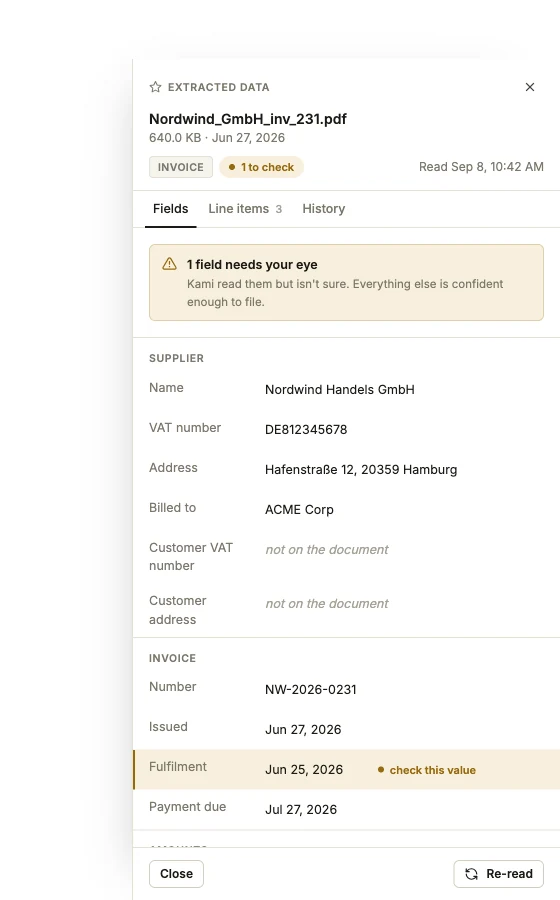
AI extracts data from invoices, bank statements and purchase orders, and files confident results by year, period and document type.
03
Fixed rules check outgoing payments against invoices. Review suggestions yourself, record why no document is owed, or ask for exactly what is missing.
Follow the payment to its paperwork.
Suggestions need your judgment.
04
See every client period’s stage across your practice. Review outstanding work, sign off and close; late documents are parked, never silently filed.
One view of what moves next.
Simple, per-user pricing
Every plan includes document collection, AI data preparation, payment checks and your AI agent. Choose the capacity your practice needs.
For independent accountants getting their time back.
€33.15per user / month
Billed annually · save 15%
From 1 user
More room for a small team and a busy client list.
€45.90per user / month
Billed annually · save 15%
From 1 user
Higher capacity for a growing accounting team.
€67.15per user / month
Billed annually · save 15%
From 3 usersMinimum monthly total: €201.45
Start with a 14-day free trial. No credit card required.
All prices are in EUR, excluding VAT. Allowances are per user and shared across your team. Included documents and AI questions reset monthly, including on annual plans.
Additional usage is billed monthly: €0.05 per document, €0.01 per AI agent question, €0.01 per additional GiB of storage per month.
Bring one client’s documents. Follow the work from collection to review and see how kami fits your practice.
Yes. kami brings document collection, preparation, payment checks and period sign-off into one workspace. Work on your own or use the firm-wide queue to see where your team’s client periods need attention.
No. Clients follow a magic link in kami’s email and upload against the open request, with nothing to install. You accept their uploads before processing. Staff can also upload directly. Email attachments can be ingested only when inbound email is enabled; it is off by default.
No. AI prepares document data; you confirm or correct uncertain results. Payment matching uses fixed rules, not AI guesses, and suggestions need your decision. Purchase-order checks compare headers and totals, not individual lines. You review flagged differences and sign off the period.
Invoices, bank statements and purchase orders or order confirmations. This includes invoice fields and line items, statement headers and transactions, and order details. Receipts, payroll, VAT returns and other documents are classified and filed by type, without field extraction.
No. You download the period’s invoice data as a CSV for use in your accounting system. kami does not push data directly into accounting software.
Your 14-day free trial starts when you register. No credit card is required. Create a client project and try the workflow with the documents you already work with.
Start with one client. Collect the documents, review the gaps and sign off with a clear trail.
Contact us